



 Jul 24,2026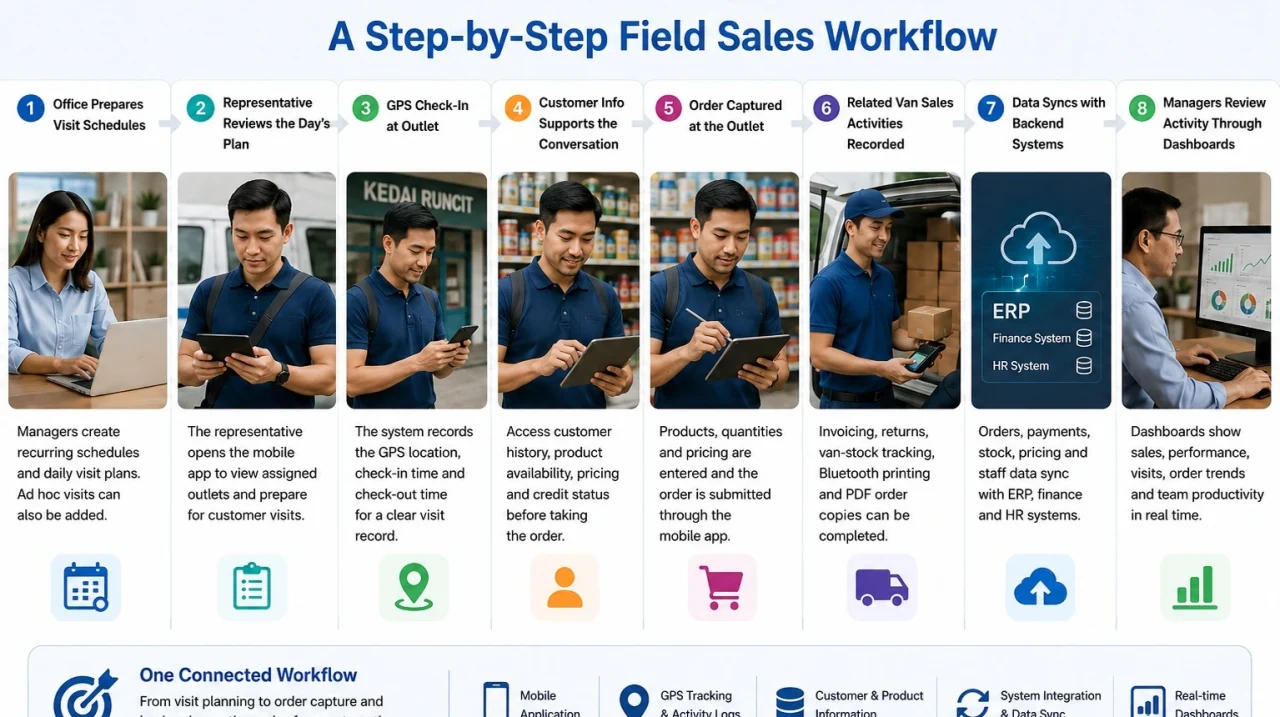
A sales representative submits an order from an outlet. For the customer, the visit may be finished. Inside the business, however, the order still needs to reach the office, update the right systems, and become visible to managers.
So, how does sales force automation work across the full process?
It starts before the representative reaches the outlet and continues after the order is submitted. Visit plans, customer information, GPS records, mobile transactions, backend systems, and dashboards are connected through one structured workflow.
For a broader introduction, read our guide explaining what sales force automation is.
The Field Sales Workflow at a Glance
Sales force automation, commonly shortened to SFA, links field representatives with office teams.
A typical workflow follows these stages:
- The office prepares visit schedules and customer data.
- The representative reviews the day’s assigned outlets.
- GPS check-in records arrival at the customer location.
- Customer, product, pricing, and credit information supports the sales discussion.
- The representative captures the order or related transaction.
- Field data synchronises with backend systems.
- Managers review activity through dashboards.
Each stage passes information to the next. The representative does not need to begin with a blank form at every outlet, and the office does not need to rebuild the transaction from handwritten notes.
Interact’s Field Sales Automation solution supports this mobile-to-office process for field sales and van sales teams.
Step 1: The Office Prepares Visit Schedules
The workflow begins with the customer visits that need to happen.
For outlets visited regularly, businesses can create recurring schedule templates. These schedules generate daily visit plans for representatives. Ad hoc customer visits can also be handled when an unscheduled stop is required.
This gives the field team a structured starting point. Representatives can see which outlets are assigned without depending on printed lists, manually updated spreadsheets, or a series of messages from supervisors.
Step 2: The Representative Reviews the Day’s Work
Before travelling to the first outlet, the representative opens the mobile application and checks the daily plan.
The representative can prepare for each discussion using the information available in the system. One customer may be placing a repeat order. Another may need a stock check, a different price list, or confirmation of available credit.
Keeping visits and customer records in one application reduces the need to search across separate files.
Step 3: GPS Check-In Creates a Visit Record
When the representative arrives, they check in through the mobile application.
The system records the GPS location and check-in time. A check-out time can also be recorded when the visit finishes. Together with automatic activity logs, this creates a clearer record of where and when the visit happened.
Managers can review whether a scheduled outlet was visited, when the representative arrived, and how long the visit took.
The purpose is not simply to track location. It is to create reliable field records without asking representatives to prepare separate visit reports later.
Step 4: Customer Information Supports the Conversation
After checking in, the representative can review the information needed for the sales discussion.
Interact’s field sales system supports access to customer history, live product availability, customer-specific pricing, and customer credit status.
This helps answer practical questions while the representative is still with the customer:
- Is a product available?
- Which price applies?
- What was ordered previously?
- Is there enough available credit?
Customer-specific pricing also reduces guesswork. Customers can be organised into groups or sales channels and linked to pre-configured price lists, allowing the appropriate price to be applied during order entry.
Step 5: The Order Is Captured at the Outlet
Once the customer confirms the purchase, the representative selects the products, enters the quantities, and submits the order through the mobile application.
The order is captured where the sale happens rather than written down for office staff to enter later.
Product availability, customer pricing, and credit information can support the transaction. The result is a structured order that can move into the next stage of processing.
Step 6: Related Van Sales Activities Are Recorded
Some field sales visits involve more than submitting an order.
Depending on the company’s process, the representative may need to issue an invoice, process a product return, or record stock carried in a sales van. Interact supports mobile van sales and invoicing, product returns, and van-stock tracking.
The representative can also print a hard-copy order through a Bluetooth printer or share a PDF copy.
Keeping these activities within the same workflow creates a more complete customer transaction record.
Step 7: Field Data Synchronises with Backend Systems
Submitting an order is not the final step. The information must reach the systems used by office teams.
Interact supports synchronisation of orders, payments, stock, pricing, and staff data between the mobile application and ERP, finance, and HR systems.
The mobile application is used during the outlet visit, while the company’s existing systems continue to manage the wider process.
In a typical business setup, the ERP may handle order fulfilment and stock records, while finance manages payments and credit.
Because the field transaction can flow into these systems, office staff do not need to manually recreate the same order from paper notes.
Step 8: Managers Review Activity Through Dashboards
Once visits and transactions are recorded, managers need a clear way to review what happened.
Interact’s Sales Power Dashboards track sales performance, customer visits, order trends, and team productivity in real time.
Managers can review outlet coverage and understand how field activity is translating into orders. They can also identify gaps that may need attention without first combining separate attendance records, order files, and end-of-day spreadsheets.
What Information Moves Through the Workflow?
| Workflow stage | Information recorded or used | Main users |
|---|---|---|
| Visit planning | Recurring schedules, daily plans, ad hoc visits | Managers and representatives |
| Outlet arrival | GPS location, check-in, check-out, activity logs | Representatives and managers |
| Sales discussion | Customer history, availability, pricing, credit | Representatives |
| Transaction | Products, quantities, invoices, returns, van stock | Field and office teams |
| System handover | Orders, payments, stock, pricing, staff data | ERP, finance, HR, operations |
| Performance review | Visits, sales, order trends, productivity | Managers |
This explains why SFA is more than a mobile order form. Its value comes from connecting work at the outlet with the teams and systems that continue the process.
What Should a Business Define Before Implementation?
Before configuring an SFA workflow, the business should map its existing field process.
Useful questions include:
- How are outlets assigned?
- Which information does a representative need before taking an order?
- Which transactions happen during a visit?
- Which system owns product, price, stock, and credit data?
- What should happen after an order is submitted?
- Which reports do managers need?
A van sales operation may require stock, invoicing, printing, and returns. Another team may mainly require scheduled visits, customer information, and mobile order submission.
The goal is to connect the necessary steps so information moves clearly from the office to the field and back again.
Frequently Asked Questions
The order can flow from the mobile application into the company’s backend ERP system. Office teams can then continue processing it without manually re-entering information from paper forms.
The mobile application exchanges operational data with backend systems. Interact supports the synchronisation of orders, payments, stock, pricing, and staff data with ERP, finance, and HR systems.
Yes. Customers can be organised into groups or sales channels and linked to customised price lists. The appropriate pre-configured price can then be applied during order entry.
GPS-based check-ins and check-outs record the location and timing of each visit. Automatic activity logs provide additional visibility into field activity.
Connect Every Outlet Visit to the Office
Sales force automation works best when the entire visit is connected—from the daily schedule and GPS check-in to the customer conversation, submitted order, backend system, and management dashboard.
For field teams, that means less time switching between paper, spreadsheets, calls, and messages. For managers and office teams, it means receiving more structured information from every outlet visit.
Explore Interact’s Field Sales Automation solution or book a personalised demo to see how the workflow can be configured for your sales operation.