


 Jul 24,2026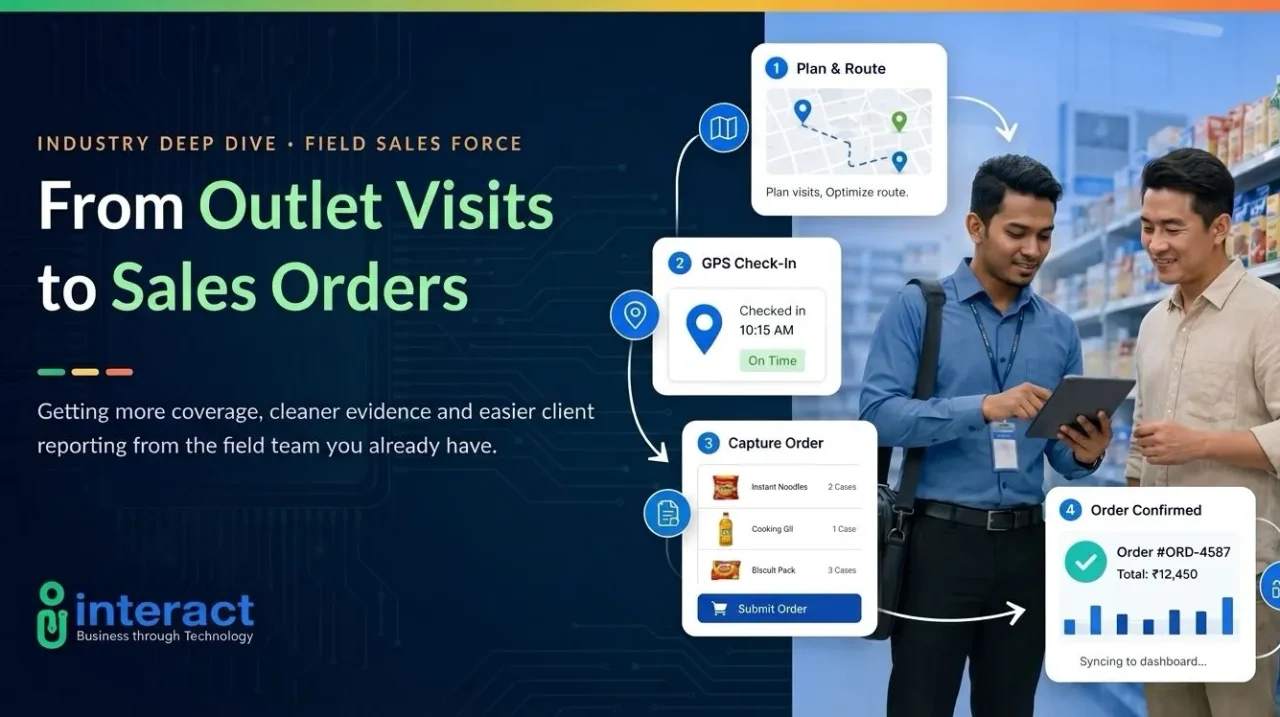
A field sales representative walks into an outlet with several tasks to complete. They may need to review the customer’s account, confirm available products, discuss a new order, and record the outcome of the visit.
The visit itself may only take a few minutes. However, the process becomes much slower when representatives rely on paper forms, spreadsheets, phone calls, and group chats.
That is where sales force automation comes in.
By connecting outlet visits, customer information, order capture, and reporting in one system, businesses can make each field visit easier to manage—from the representative’s arrival to the office receiving the submitted order.
1. What Is Sales Force Automation?
Sales force automation, commonly shortened to SFA, is software that helps businesses manage routine sales activities.
For field sales teams, it may include:
- Planning recurring outlet visits
- Managing ad hoc customer visits
- Recording GPS check-ins and check-outs
- Viewing customer and purchase history
- Checking live product availability
- Applying customer-specific pricing
- Reviewing customer credit status
- Capturing orders through a mobile device
- Issuing invoices and recording returns
- Tracking van stock
- Reviewing sales activity through dashboards
The purpose is not simply to monitor where representatives go.
A good SFA system gives representatives the information they need while speaking with customers. Instead of calling the office to confirm stock, pricing, credit, or previous orders, they can access the information through a mobile application.
Interact’s Field Sales Automation solution brings outlet tracking, mobile order capture, van sales, customer credit visibility, dashboards, and business-system integration into one field-sales workflow.
2. Why Manual Field Sales Processes Become a Problem
Manual processes may be manageable when a sales team is small. As the number of representatives, outlets, products, and daily orders grows, those processes become harder to control.
An order written on paper may need to be entered again by office staff. A representative may need to call the office to confirm a customer’s price or available credit. Managers may also have to wait until the end of the day to know whether scheduled visits were completed.
Information is often divided between different teams.
The field representative has the order details. Finance manages the customer’s credit information. The warehouse or ERP system holds product and stock data.
When these systems are disconnected, even a straightforward order can take longer to process.
Interact’s field sales platform can connect information from the mobile application with existing ERP, finance, and HR systems, helping field and office teams work from the same data.
3. How Does Sales Force Automation Work?
Sales force automation connects the different stages of a field sales visit in one digital workflow.
Before leaving for the day, a representative can review scheduled outlets through the mobile application. When they arrive at a customer location, GPS check-in and check-out records help confirm that the visit took place.
During the visit, the representative can access customer history, live product availability, customer-specific pricing, and credit information. They can then capture the order directly through the application instead of recording it on paper for someone else to enter later.
Depending on the company’s sales process, the same workflow may also support invoicing, product returns, van-stock tracking, order printing, and PDF order copies.
Once the visit is complete, the information can be synchronised with backend systems and made available to managers through dashboards.
In simple terms, the process connects the daily visit plan, customer conversation, submitted order, and office workflow.
For a detailed breakdown of every stage, read our guide on how sales force automation works
4. What Are the Benefits of Sales Force Automation?
The main benefit is not automation by itself. It is removing repetitive work that slows down representatives and office teams.
Faster Order Processing
Orders are captured at the outlet and sent into the company’s backend workflow.
This reduces manual re-entry and allows the relevant office teams to begin processing the order sooner.
Better Information During Customer Visits
Representatives can access customer history, product availability, pricing, and credit information while they are at the outlet.
This helps them complete more of the sales process without waiting for information from the office.
Clearer Outlet-Visit Records
GPS check-ins, check-outs, and activity records give managers a clearer view of completed field visits.
This reduces dependence on handwritten attendance records or separate visit reports.
Less Administrative Work
Representatives spend less time completing paper forms or preparing spreadsheets after each visit.
Office staff also spend less time entering information that has already been captured by the field team.
Better Sales Visibility
Managers can review customer visits, sales performance, order trends, and team productivity through dashboards.
This gives them a clearer view of what is happening in the field and helps them respond using current information.
Plan smarter outlet sequences and field routes to improve coverage, productivity, and visit efficiency. See how constraint-aware route optimisation and ePOD work in FMCG delivery →
5. Does Your Business Need Sales Force Automation?
Sales force automation may be useful when:
- Representatives visit many outlets every day
- Orders are still recorded on paper or through messages
- Office staff repeatedly enter the same order information
- Managers struggle to verify completed outlet visits
- Representatives frequently call the office to confirm stock or pricing
- Customer credit information is not readily available in the field
- Sales reports only become available at the end of the day
- Field activity is disconnected from ERP or finance systems
The right solution should match the way the field team actually works.
Some businesses may mainly require visit planning, customer information, and mobile order capture. Van sales operations may also require van-stock tracking, invoicing, payment handling, and product returns.
Rather than choosing a platform based only on the number of features, businesses should consider whether it makes outlet visits easier to complete, easier to verify, and easier to turn into orders.
Improve shelf availability, promotion execution, and planogram compliance across modern and traditional trade channels. Read our latest insights on foodservice and perishable distribution →
Frequently Asked Questions
Sales force automation is software that helps sales teams organise visits, access customer information, take orders, and report activities through one connected system.
No. A CRM mainly manages customer relationships, contacts, and opportunities. Sales force automation focuses more on completing sales activities such as outlet visits, order capture, pricing checks, and field reporting.
Yes. A field sales system can use GPS check-ins and activity records to confirm when representatives arrive at and leave customer locations.
Yes. Representatives can select products, enter quantities, apply the correct customer pricing, and submit orders through a mobile application. The order can then be synchronised with the company’s backend system.
Turn Every Visit into a Sales Opportunity
A field visit should not end with a handwritten order waiting to be processed.
With the right system, outlet activity, customer information, orders, and sales data can move through one connected workflow—from the representative’s check-in to the office receiving the submitted order.
Explore Interact’s Field Sales Automation solution or book a personalised demo to see how it can support your field team.