


 Aug 19,2026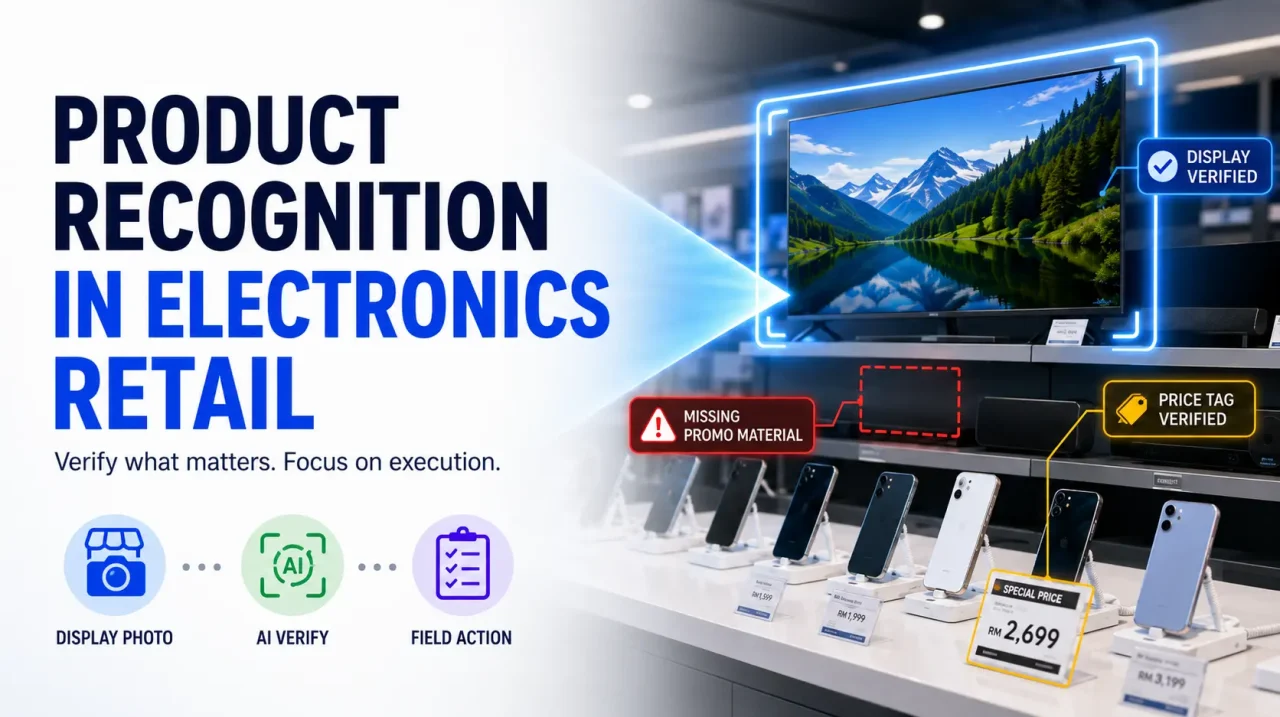
Most published guidance on product recognition assumes a grocery aisle: rows of packaged goods, repeated facings, a planogram to compare against. Consumer electronics retail looks nothing like that. A single fixture may hold eight televisions, a demo bench of three phones, a locked cabinet of high-value stock, and an accessory wall with two hundred pegged items.
Teams that lift an FMCG recognition setup directly into an electronics environment usually get disappointing results — not because the technology fails, but because it was pointed at the wrong things.
Consumer electronics retail is a wide field covering assortment, pricing architecture, e-commerce, trade-in programmes, and after-sales service. This article addresses one part of it: in-store execution verification — using image analysis during field visits to confirm that displays, pricing, promotional materials, and product presence match what was agreed with the retailer or dealer. What follows is a sequence for setting that up properly.
Why Electronics Floors Break FMCG Recognition Assumptions
Before configuring anything, it is worth being explicit about the differences. They determine almost every design decision that follows.
| Dimension | FMCG shelf | Consumer electronics floor |
|---|---|---|
| Unit count | Many facings of each SKU | Often one display unit per model |
| Visual distinctiveness | Colourful packaging designed to stand out | Similar dark rectangles; variants differ by size, port layout, or badge |
| Reference standard | Planogram with defined positions | Display guidelines, fixture layouts, brand zone agreements |
| Failure mode | Empty shelf space | Wrong model on display, dead demo unit, missing price card, encroached brand zone |
| Capture conditions | Even aisle lighting | Backlit screens, glass cabinets, spotlighting, reflections |
| Stock verification | Visual count of facings | Serialised units; scanning is more reliable than vision |
The last row matters most. A recurring mistake is expecting image analysis to verify serialised inventory. It cannot reliably distinguish a 256GB handset from a 512GB one of the same colour, and it should not be asked to. That check belongs to barcode or serial scanning.
Important point: In electronics retail, product recognition verifies presentation, not inventory. Keep those two questions on separate tools and the whole programme becomes more dependable.
Step 1: Map the Store by Verification Method, Not by Product
Start by dividing the retail floor into zones and deciding, for each one, whether the reliable check is visual, scanned, or human judgement. This single exercise prevents most of the disappointment that follows a poorly scoped rollout.
Step 2: Write the Display Standard Before Buying the Technology
Recognition compares what it sees against a defined expectation. In grocery that expectation is a planogram. In electronics it is usually a display guideline, and it is frequently vaguer than teams realise.
“Hero model in the premium position” is a sentence a merchandiser can interpret. It is not something a system can evaluate. Before configuring anything, convert the guideline into checkable statements: which models must appear on the fixture, in what order, with which price card format, which POSM version, and how much linear space the brand zone occupies.
This step also surfaces disagreements worth resolving. Trade marketing, the account team, and the retailer may each hold a different understanding of what was agreed for a given store tier. Recognition will expose that inconsistency as a flood of false exceptions unless it is settled first.
Step 3: Build a Reference Set That Handles Near-Identical Models
This is the hardest part of electronics recognition and the one most often underestimated.
Two adjacent models in a television range may differ only in panel size and a small badge. A handset series may span four variants with the same silhouette. Successive model years often change very little externally. A reference set therefore needs to capture the features that actually distinguish variants — bezel proportions, stand design, port arrangement, camera module layout, model badges — and it needs maintaining as ranges refresh.
Be realistic about where the boundary sits. Some distinctions cannot be made visually at all, and a sensible configuration accepts that. It is better for a system to report “a model from this series is present” and let the merchandiser confirm the exact variant than to guess confidently and be wrong.
Step 4: Standardise Capture for a Difficult Visual Environment
Electronics retail is unusually hostile to photography. Screens emit light, glass cabinets reflect, spotlights create hotspots, and fixtures are often too wide to capture in one frame from a narrow aisle.
Practical capture rules make a measurable difference:
- Define how wide fixtures are split across multiple frames, and how much overlap each frame carries.
- Specify a shooting angle that avoids direct reflection from glass and screens.
- Require price cards and shelf-edge labels to be legible in at least one frame, since these often carry the most commercially urgent findings.
- Decide whether demo screens should be photographed on or off, and keep that consistent across the network.
- Include difficult stores in the pilot — cramped dealer outlets, heavily lit flagship floors, and cabinets behind glass.
Step 5: Route Each Exception Type to a Different Owner
Electronics execution failures rarely share a single fix. Sending them all to one inbox recreates the bottleneck the technology was bought to remove.
Presentation gaps
Missing price card, wrong POSM version, disordered accessory pegs. Usually correctable during the same visit.
Agreement breaches
Brand zone encroached, agreed hero model absent, competitor material inside contracted space. Needs a commercial conversation.
Display unit shortfalls
Demo unit never delivered, damaged, or withdrawn. Resolved through the display allocation and logistics process.
Assigning ownership in advance is what converts a detection into a correction. Detection alone changes nothing on the floor.
Step 6: Pilot Narrowly, Then Widen
Choose one product category and one retailer or dealer group. Run it long enough to cover a full promotional cycle and at least one range refresh, because the refresh is where reference-set maintenance is tested.
Three questions determine whether to widen the scope. Are the flagged exceptions ones the commercial team actually cares about? Do supervisors trust the findings enough to stop re-checking every image? And is the follow-up genuinely happening, or are exceptions accumulating in a dashboard nobody owns?
A useful sanity check for managers: if the pilot were switched off tomorrow, would anyone in the field organisation notice within a week? If not, the findings were never connected to action.
Where Interact Fits
Interact supports execution across several consumer sectors, including electronics and equipment brands and telco and mobile retail networks, where outlet visits, device visibility, merchandising, and retail execution run across dealer networks.
The Field Merchandising solution handles the visit layer: smart visit planning and task assignment, availability and display photos, price checks, stock takes, promotion compliance, share-of-shelf monitoring, and dashboards that surface incomplete tasks and weak visibility by location.
Interact’s AI-Powered Field Execution capabilities analyse captured photos for display compliance, price and promotion verification, competitor presence, and execution gaps — the checks that map onto the blue zones in the diagram above.
For structured verification across a dealer network, Store Compliance Audits provides task-based audit execution, trade compliance checks covering pricing, promotions, SKU listings and display standards, AI-verified photo evidence, and access for internal teams as well as third-party compliance partners — useful where a brand relies on agency auditors across a wide dealer footprint.
If you are approaching this from the FMCG side, our article on AI image recognition in retail execution covers the shelf-led version of the same discipline, and how to improve merchandising execution sets out the surrounding operating process.
The Short Version
Product recognition works well in consumer electronics retail when it is scoped to presentation questions on visually verifiable zones, supported by a display standard specific enough to check against, and backed by a reference set maintained through range refreshes.
It works badly when it is asked to count serialised stock, judge whether a demo unit is functioning, or evaluate a display guideline that was never written precisely. The technology is not the constraint in either case. The definitions are.
Frequently Asked Questions
Sometimes, and only when the reference set captures genuinely distinguishing features such as bezel proportions, stand design, port arrangement, or model badges. Where two variants differ mainly by internal storage or specification, visual analysis should not be relied on. A practical configuration reports the series and asks the merchandiser to confirm the variant.
No. Serialised units are better verified through barcode or serial scanning. Image analysis is suited to presentation questions such as which models are on display, whether price cards and promotional materials are present, and whether brand zone boundaries are being respected.
They can degrade results noticeably. Standardising the shooting angle, splitting wide fixtures across overlapping frames, and deciding consistently whether demo screens are photographed on or off all help. Difficult stores should be included in the pilot rather than avoided.
No. Someone still has to capture usable photographs, confirm that demo units are charged and functioning, correct presentation issues on the spot, and manage the relationship with dealer staff. Recognition reduces repetitive review work; it does not remove the visit.
See Recognition Tested Against Your Own Display Standards
Bring your fixture layouts, model range, and dealer network. We will walk through which checks image analysis can verify reliably and which belong to scanning or a person on the floor.
Book a Personalised Demo