


 Aug 14,2026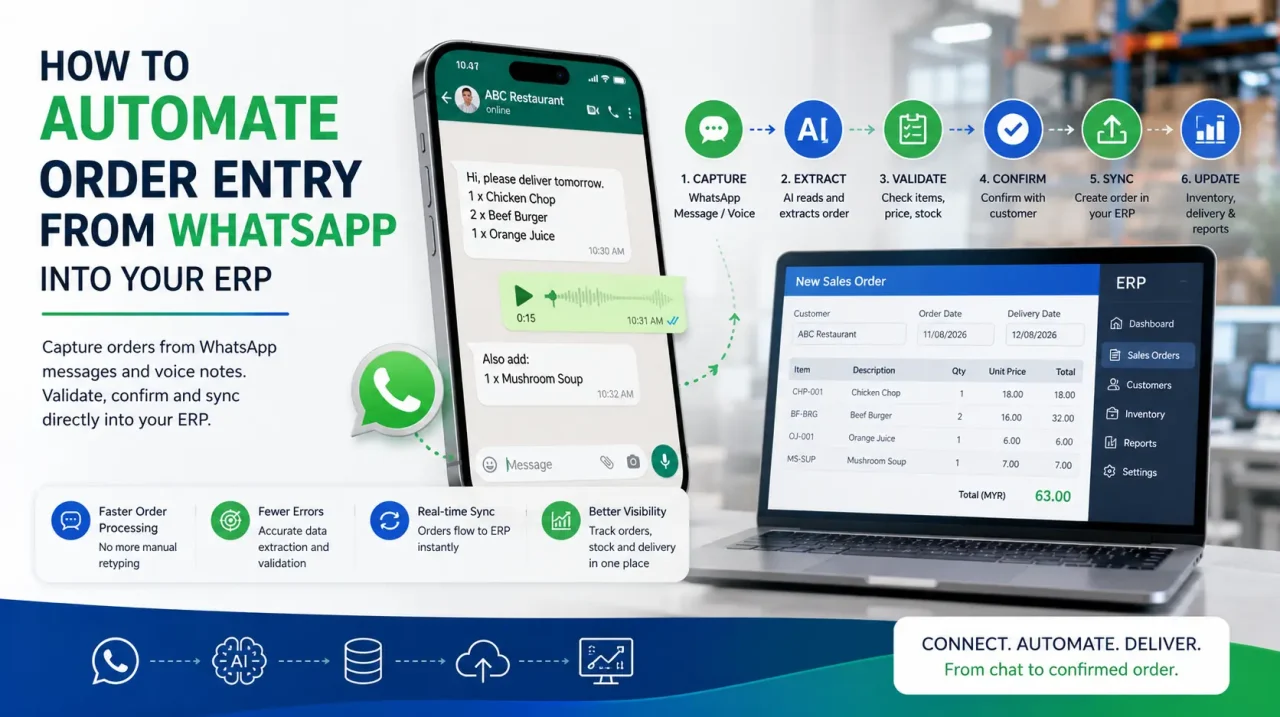
If you want to automate order entry from WhatsApp, the first thing worth settling is which part of the process you are actually automating. Not the ordering. Your customers can continue sending the same messages, voice notes and photos of handwritten lists they already use. What changes is the step in between: reading the order, interpreting what the customer means, matching it to the correct products, validating the details, and entering it into AutoCount, SQL Accounting or SAP.
The distinction matters because changing customer behaviour and automating internal processing are two different projects. Asking a long tail of small traders to stop using WhatsApp can be difficult to sustain, particularly when messaging and voice notes are already quick and familiar. Removing the manual re-keying behind those messages is a systems problem that can be addressed without forcing the customer to adopt a new ordering habit.
Order management as a discipline is broad. It includes pricing policy, credit terms, fulfilment, invoicing and collections. This guide focuses on one specific part of that process: the path from an inbound WhatsApp message to a validated sales order in the accounting or ERP system, with less manual re-entry in between.
Different customers may still need different ordering channels. A retailer ordering app can suit accounts that are comfortable using a structured self-service channel, while mobile order capture through a field sales solution can support accounts visited by sales representatives. WhatsApp order automation addresses another part of the customer base: buyers who prefer to continue ordering through messages and voice notes.
For a broader explanation of the technology behind this workflow, read What Is WhatsApp Order Taking AI? Voice Notes to ERP Orders.
What It Means to Automate Order Entry From WhatsApp
Between a message arriving and a sales order existing, an order desk usually performs a sequence of small tasks. Individually, none of them appears especially difficult. Together, they can create a large amount of repetitive work.
- Reading a text message or replaying a voice note to confirm a quantity.
- Decoding shorthand, abbreviations and local pack units.
- Matching a customer’s product description to the correct SKU.
- Applying the correct customer-specific price.
- Checking stock availability and relevant credit conditions.
- Entering the order into the accounting or ERP system.
- Confirming the order and handling follow-up questions or exceptions.
Breaking the process into individual steps is useful because it shows what can be standardised, what depends on clean reference data, and which situations still need human judgement.
Before You Automate, Baseline the Cost of Manual Order Entry
Before changing the process, record a baseline. Otherwise, it becomes difficult to prove whether the new workflow actually reduced effort, errors or delay.
- Handling time per order. Measure from the moment a staff member opens the message until the order is saved. Include text orders, voice notes and orders that need clarification.
- Error rate at entry. Separate wrong-item, wrong-quantity and wrong-price corrections from problems caused by delivery, damage or other downstream issues.
- Order-to-invoice time. Measure the gap between the customer message arriving and the order progressing into the next internal stage. Pay attention to orders received outside normal office hours.
Worth measuring separately: the share of the day lost to interruption. Status enquiries often arrive on the same channel as orders and may be answered by the same people who are entering them. That switching cost can become significant and is easy to overlook unless it is measured deliberately.
Six Steps to Automate Order Entry From WhatsApp
Step 1 — Consolidate the Numbers Orders Arrive On
Growing distributors often accumulate order channels rather than design them: an office number, personal sales numbers, shared devices, and numbers that belonged to people who have left the company. Automation works best when orders arrive through channels the business controls.
Map the current numbers first. Decide which number or approved channel should become the long-term order entry point, then move customers gradually rather than switching everything overnight. During the transition, make sure customers still receive a response when they use an older number.
Step 2 — Build the SKU Alias List
This step is easy to underestimate. Your catalogue contains formal product names and SKU codes. Customers may refer to the same products by colour, size, old packaging, nicknames, abbreviations or pack units such as carton, case, bottle or piece.
Use real historical orders to build a practical alias list. Record the terms customers actually use and map them to the correct SKU, pack size and unit of measure. When one phrase could mean more than one product, mark it as something that requires clarification rather than forcing an automatic match.
Step 3 — Write Down the Clarification Rules
Experienced order desk staff already apply clarification rules, but those rules may exist only in their heads. A message such as “same as last time”, an unusual quantity, a discontinued product or an unclear pack size may trigger a phone call or follow-up message.
Document those situations. Decide when the workflow can use previous order history, when a substitute may be suggested, when the customer must confirm a quantity, and when the order should stop for human review. Automation becomes safer when uncertainty is treated as a defined branch in the process rather than an exception nobody planned for.
Step 4 — Define What Must Be Validated Before Posting
An order that reaches the ERP unchecked has not removed the problem; it has moved the problem further downstream. Incorrect products, quantities, prices, stock assumptions or credit conditions can reappear later during fulfilment, delivery or collection. Decide in advance which checks must pass before a sales order can be posted automatically.
Depending on the business process, validation may include:
- Customer account identification
- Product and SKU match
- Quantity and unit of measure
- Customer-specific pricing
- Stock availability
- Credit status or other account rules
- Delivery date or cut-off requirements where relevant
The exact rules should match the controls already used by the business. Automation should apply those controls consistently, not silently bypass them.
Step 5 — Post the Order Into the Accounting or ERP System
The useful end state is a structured sales order inside the system your office already uses, rather than another spreadsheet, export file or inbox that somebody still has to process manually.
Interact’s WhatsApp Order Taking AI is designed to interpret WhatsApp orders, validate the required order information and create sales orders in systems such as AutoCount, SQL Accounting and SAP. The exact workflow depends on the integration and business rules configured for the organisation.
Timing matters more in some categories than others. For foodservice distributors handling short order cut-offs or perishable products, a delay between the customer message and system entry can affect the next fulfilment step. Removing unnecessary re-keying helps shorten that hand-off.
Step 6 — Agree the Escalation Rules Before Go-Live
Not every message should become an order automatically. Decide which situations require a person to review the original message and the system’s interpretation before anything is posted.
Examples may include a new account with no trading history, an unusual quantity, an account on credit hold, an ambiguous product description, or a message that turns out not to be an order at all.
A useful escalation should show the reviewer what the customer sent, how the order was interpreted, which check failed, and what decision is required. That reduces the need to reconstruct the conversation from the beginning.
What Should Stay With a Person?
Automating order entry does not mean removing people from the order desk. It changes where their attention is most valuable.
Routine orders with clear products, quantities and account rules can move through a structured workflow. Human judgement remains important for ambiguity, unusual commercial requests, credit exceptions, new customers, disputed prices, substitutions, and conversations that do not fit the standard process.
The better operating model is exception-based. Let automation handle repeatable order-entry work and direct people towards the orders that genuinely require judgement.
How to Tell Whether WhatsApp Order Automation Is Working
Measure the new process against the baseline rather than relying on whether it feels faster.
- Automation rate. The proportion of genuine orders that complete without manual re-entry.
- Exception rate by reason. Group exceptions by cause so you can see whether product aliases, pricing rules, account data or another part of the workflow needs improvement.
- Order handling time. Compare the time spent on routine orders before and after automation.
- Order-to-invoice or order-to-processing time. Track whether orders move through the internal workflow faster.
- Order-entry corrections. Monitor wrong-item, wrong-quantity and wrong-price issues that can be traced back to order capture.
Do not optimise only for a high automation rate. A workflow that posts uncertain orders automatically may look efficient while creating more downstream corrections. The better target is a high proportion of routine orders processed correctly, with unclear cases escalated early.
Frequently Asked Questions
Yes. A WhatsApp order automation workflow can interpret an incoming customer order, match products, validate the required information and create a structured sales order in the connected accounting or ERP system. The exact workflow depends on the system and business rules in use.
Yes. Voice notes can be transcribed and interpreted before product names, quantities and other order details are matched against business data. Ambiguous information should be clarified before the order is posted.
Validation may include the customer account, product or SKU, quantity, pack size, customer-specific price, stock availability, credit status and other rules required by the business before an order is accepted.
Not necessarily. Automation is better suited to repetitive work such as reading, matching, validating and entering routine orders. People remain important for ambiguous requests, exceptions, unusual commercial decisions and customer issues that require judgement.
Take the Typing Out of Your Order Desk
Send us a sample of real WhatsApp orders from your customers. We can show how the workflow interprets and validates them, and how a structured sales order can move into your existing accounting or ERP process.
Book a Personalised Demo